
HTML Basic Structure and Tags
What is the Structure of an HTML Document?
Every HTML page follows a specific structure that helps the browser understand how to display the content.
It starts with a document declaration and is followed by elements like <html>, <head>, and <body>.
Basic HTML Document Structure
Here’s a simple example:
<!DOCTYPE html>
<html>
  <head>
    <title>My First Web Page</title>
  </head>
  <body>
    <h1>Welcome to HTML Learning</h1>
    <p>This is a sample paragraph.</p>
  </body>
</html>
Explanation of Each Part:
| Part | Description |
|---|---|
<!DOCTYPE html> | Tells the browser that this is an HTML5 document. |
<html> | The root element that contains the entire HTML code. |
<head> | Includes meta information, title, and links to CSS or JS files. |
<title> | Sets the title that appears on the browser tab. |
<body> | Contains the visible content of the web page. |
The <html> Element
The <html> tag is the root of the HTML document.
All other tags are written inside it.
Example:
<html>
  <!-- All content goes here -->
</html>
The <head> Element
The <head> section stores information about the page that isn’t displayed directly on the screen.
It may include:
The page
<title>Meta information (like keywords and description)
Links to CSS files or external scripts
Example:
<head>
  <title>My Website</title>
  <meta charset="UTF-8">
  <meta name="description" content="Learning HTML basics">
  <link rel="stylesheet" href="style.css">
</head>
The <body> Element
The <body> section holds everything you see on a webpage:
headings, text, images, links, lists, and tables.
<body>
  <h1>Welcome!</h1>
  <p>This is visible to users.</p>
  <img src="example.jpg" alt="Example Image">
</body>
What are HTML Tags?
HTML tags are special keywords enclosed in angle brackets < >.
They tell the browser how to display content.
Example:
<p>This is a paragraph.</p>
Here:
<p>→ Opening tag</p>→ Closing tagThe text in between is the content.
Commonly Used HTML Tags
| Tag | Description | Example |
|---|---|---|
<h1>–<h6> | Headings (largest to smallest) | <h1>Heading 1</h1> |
<p> | Paragraph | <p>This is a paragraph.</p> |
<a> | Link (anchor) | <a href="https://example.com">Visit</a> |
<img> | Image | <img src="image.jpg" alt="Example"> |
<br> | Line break | Line 1<br>Line 2 |
<hr> | Horizontal line | <hr> |
<div> | Division or container | <div>Section</div> |
<span> | Inline text container | <span>Text</span> |
Example: Simple HTML Page
<!DOCTYPE html>
<html>
  <head>
    <title>Basic HTML Page</title>
  </head>
  <body>
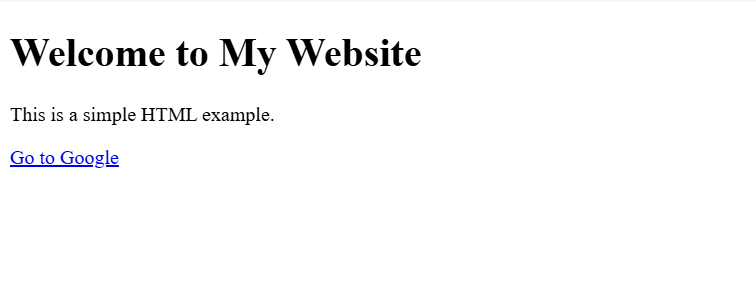
    <h1>Welcome to My Website</h1>
    <p>This is a simple HTML example.</p>
    <a href="https://www.google.com">Go to Google</a>
  </body>
</html>
Output:
A simple web page showing a heading, a paragraph, and a clickable link.
Summary
-
HTML structure starts with
<!DOCTYPE html>. -
<html>wraps everything. -
<head>contains metadata and title. -
<body>contains visible content. -
Tags are used to define elements like headings, paragraphs, and links.